Skip to content
Timix.AI Timix.AI

Marketing & advertising agencies

Time tracking and profitability for marketing agencies

The retainer says forty hours and you delivered sixty — every month, for free, without deciding to. Whether it's a creative retainer, a PR programme, or a fixed-fee campaign, Timix.AI tracks hours against each budget live, flags over-servicing before it eats the month, and shows which clients actually make you money.

90-day free trial, full access, no credit card.

One week, every account filed
  • Acme · monthly retainer — T&M cap 40 h 34.0 h
  • Borealis · campaign launch — Fixed Price 18.5 h
  • Internal · new-biz & admin — OVH 7.0 h
  • Retainer burn · Acme this month 85% of cap

Illustrative entries

01 The problem

Over-servicing is the discount you never agreed to

Agency margin doesn't vanish in one big mistake — it slips away an extra round at a time, a 'quick' favour, a retainer hour at a time. By the time you feel it, the quarter's already paid for it.

Retainers get over-serviced, invisibly

A retainer covers a set number of hours, but without live burn against that cap, nobody sees the account drift to one-and-a-half times scope until the month is gone. The over-servicing was free to the client and expensive to you — and it repeats every cycle.

Fixed-fee campaigns blow the estimate

Rounds of revisions, a moving brief, 'while you're at it' asks. On a fixed campaign fee each one eats margin silently. Without a budget burning down against the estimate, the overrun only surfaces when the work is done and the fee is spent.

Nobody knows which clients actually pay off

The biggest-billing client can be the least profitable once you count every serviced hour at cost. Without profit per client, you keep feeding the account that's quietly underwater and starving the one that isn't.

02 How Timix.AI fits

Retainer burn, campaign budgets, profit per client

Budgets with live burn, three billing types, and dual-rate profitability were built for protecting margin on retainer and project work — which is the whole agency game.

Retainer caps that warn before you over-service

Set an hour-cap budget on each retainer with soft and hard limits. Timix.AI burns it down from live hours and alerts at the threshold you choose, so the account team sees 'we're at 85% of Acme's hours' with a week still to go — not after the month closes.

T&M hour-cap budgets with soft and hard limits, computed from live hours, with configurable thresholds.
Retainers, campaigns, and new-biz, side by side

Run a monthly retainer and a fixed-fee campaign for the same client in one tree, with internal and new-business time tracked separately as Overhead. Each billing type computes correctly, so retainer burn and campaign margin never blur together.

3 billing types — T&M, Fixed Price, OVH — coexist in one client tree.

Entry creatives will actually do

A persistent timer that survives navigation, a week grid with Copy Last Week, and Timix.AI — type 'log 2 hours on the Acme retainer' and it's filed. The less timesheets feel like bureaucracy, the more honest your retainer burn becomes.

Time entry by timer, week grid, or calendar — or one sentence to Timix.AI on all paid plans.

Profit per client, in your brand

Customer and cost rates roll revenue, cost, profit, and margin up per client, so you can see which accounts pay off. Client-facing hours reports export to PDF — branded with your studio's logo and colour on Professional and Business plans.

Dual-rate profitability roll-ups plus branded PDF exports (Professional+).

3 billing types in one client tree — retainer, campaign, internal
2 limits on every retainer cap — soft warns, hard stops
Many built-in report pages, including customer billing and profitability
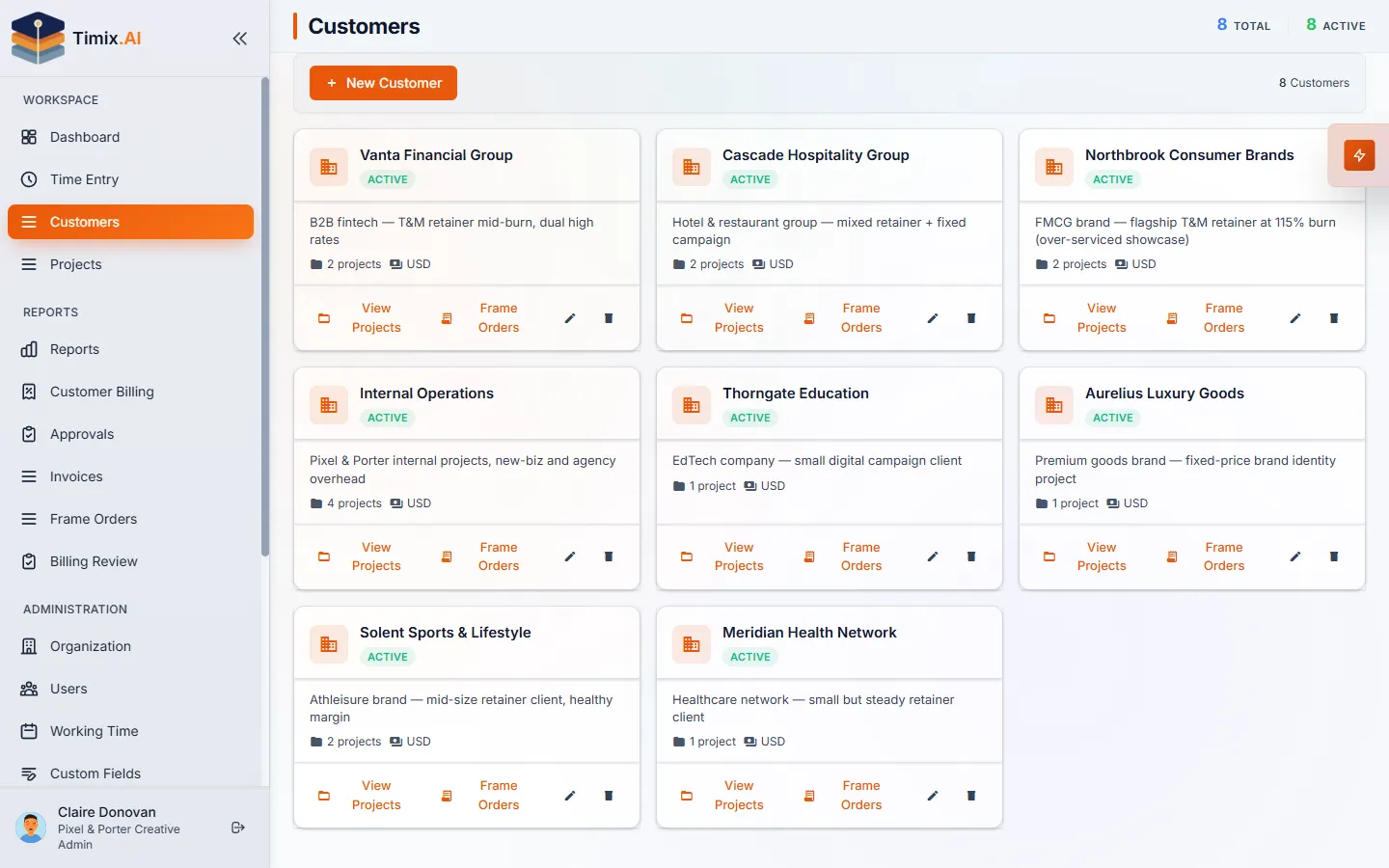
The Timix.AI customers view — the agency's client roster, each with its project count and currency.

On the reports tab

Reports you'll actually open

Built-in report pages ship with every workspace. These are the ones this team reaches for — each one exports to PDF or CSV, billing-ready.

  • Customer Billing
  • Budget vs Actual
  • Revenue Analysis
  • Resource Utilization
  • Unbilled Time

By role

One ledger, read differently

Owner, Admin, Finance, Manager, Member, Viewer — six roles, scoped so each person sees exactly what they should.

Owner / Admin

Owners set customer and cost rates, configure retainer hour caps with soft and hard limits, and read profit and margin per account in Revenue Analysis. Admins manage clients, projects, and the org's branding for client-facing PDFs.

Manager

Account leads watch retainer burn on the dashboard, get the threshold alert when an account drifts toward its cap, and review and approve their team's hours — Draft to Submitted to Approved, with reject-and-reason when an entry lands on the wrong client.

Member / Viewer

Creatives and freelancers log against the right retainer with a persistent timer, the week grid's Copy Last Week, or one sentence to Timix.AI. Viewers — a finance partner or a client-services lead — read the same numbers without being able to change an entry.

03 See it with real agency data

Open the agency demo — no signup

A pre-seeded creative agency — Pixel & Porter Creative — with retainer clients burning near their caps, fixed-fee campaign projects, internal new-business time as Overhead, dual client and cost rates, and months of realistic time data. Check which retainer is over-serviced, read the profit per client, ask Timix.AI which accounts are running hot. It resets every 48 hours, so break whatever you like.

Open the live agency demo No account needed

04 FAQ

Agency time tracking, asked and answered

We're a PR / earned-media shop — does this fit us too?

Yes. PR and comms agencies run the same retainer-plus-project shape: a monthly media-relations retainer on a T&M hour cap, a launch or crisis push as a Fixed Price engagement, and pitching, monitoring, and admin tracked as Overhead. Hour-cap budgets, threshold alerts, and profit per account work identically whether the deliverable is a campaign or a placement — there's no PR-specific feature to switch on.

Can it track hours against a monthly retainer cap?

Yes. Put a T&M hour-cap budget on the retainer with soft and hard limits; Timix.AI burns it down from live hours and alerts at your chosen threshold, so you catch over-servicing while there's still time to manage the account.

Will it bill or invoice the retainer for us?

On Professional and up, Timix.AI generates commercial invoices from retainer hours (branded PDF, your tax rate). It also produces billing-ready and client-facing hours reports — PDF or CSV, optionally branded — for whatever you invoice from. It won't auto-bill or collect payment.

Can clients log in to see their hours?

No — there's no client portal. Clients receive exported PDF reports, branded with your logo and colour on Professional and Business plans; they don't get a login.

Does it integrate with our project or ad tools?

There are no ready-made third-party connectors and no ad-spend or media tracking — Timix.AI tracks labour hours, budgets, and margin only. Professional and Business plans include a key-authenticated Integration API to build your own sync, and bulk CSV import covers existing clients, projects, and tasks.

Ready when you are

Stop over-servicing the retainer for free.

90-day free trial on every new workspace — full access to everything, no credit card.