
Month-end close is the routine that freezes a finished billing period so its numbers stop moving. Once the month is locked, finance has a stable snapshot to bill from — approved hours and totals can’t shift after the fact.
The two steps
Every successful close follows the same order:
- Everyone submits their time and it gets Approved. The approval workflow is the prerequisite: hours must reach Approved status before close, or they won’t be part of the locked record. See the approval workflow tutorial if that step isn’t set up yet.
- The billing month closes and locks. Once closed, approved hours and period totals are frozen. Finance can bill confidently from a number that won’t change.
Configure the close in Organization Settings
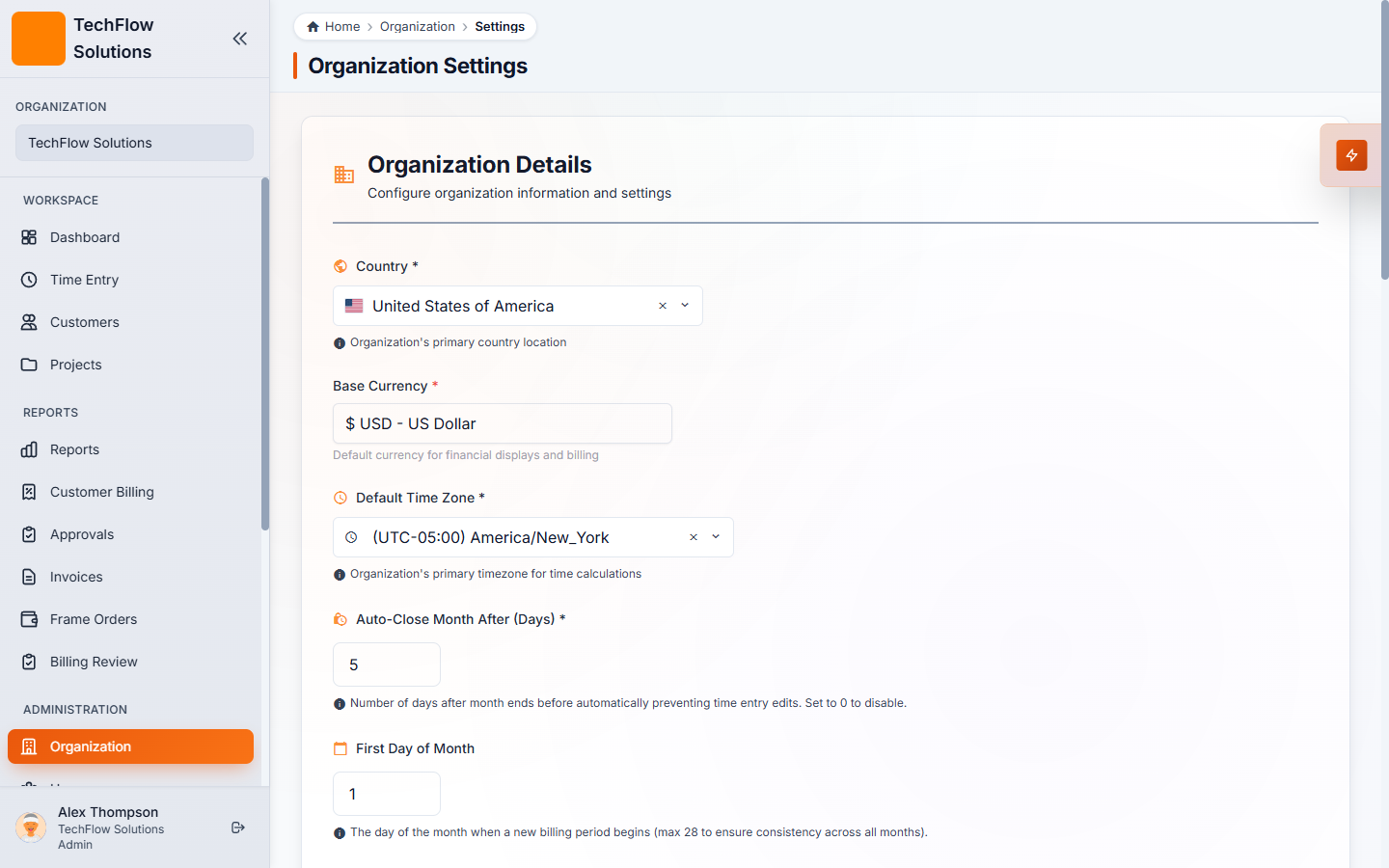
Open Organization → Settings (Organization Details). Two fields control when and how the lock happens:
- Auto-Close Month After (Days) — the number of days into the next month before the previous period closes automatically. Setting this to 5, for example, closes the previous month on the 5th of the new month, giving the team a few days to catch any last submissions.
- First Day of Month — defines where each billing period starts, so your close aligns with your actual billing calendar.
What finance sees after close
After the period locks, the billing team has a stable, auditable snapshot: every approved hour is in place and the totals are fixed. The next step — turning that snapshot into customer invoices — is covered in the Closing the month: billing customers tutorial.